What is a dynamic workflow?
Adynamic workflow turns a single complex request into a structured, multi-step plan that CREAO runs end to end. Instead of working through a large task in one long back and forth, you describe the goal, CREAO proposes a set of connected tasks shown as a visual graph, and once you approve, each step runs in turn with live progress, summaries, and results.
Dynamic workflows are ideal when a request naturally breaks into parts: comparing several options, researching multiple sources in parallel, or producing a deliverable that depends on earlier steps. They are ad hoc by design. You describe a goal and CREAO runs it once. For a multi-step process you repeat with different inputs, an agent packages the same kind of work into something reusable.
How dynamic workflows work
Every dynamic workflow follows the same three beats: you describe a goal, you review the plan CREAO proposes, and you approve it to run. CREAO decides how to break the goal into phases and tasks based on what you describe; the plan is not hand-edited before it runs.
1. Describe the goal
Send a /workflow command with what you want to accomplish. The clearer the goal, the better the plan CREAO can structure for it.
2. Review the proposed plan
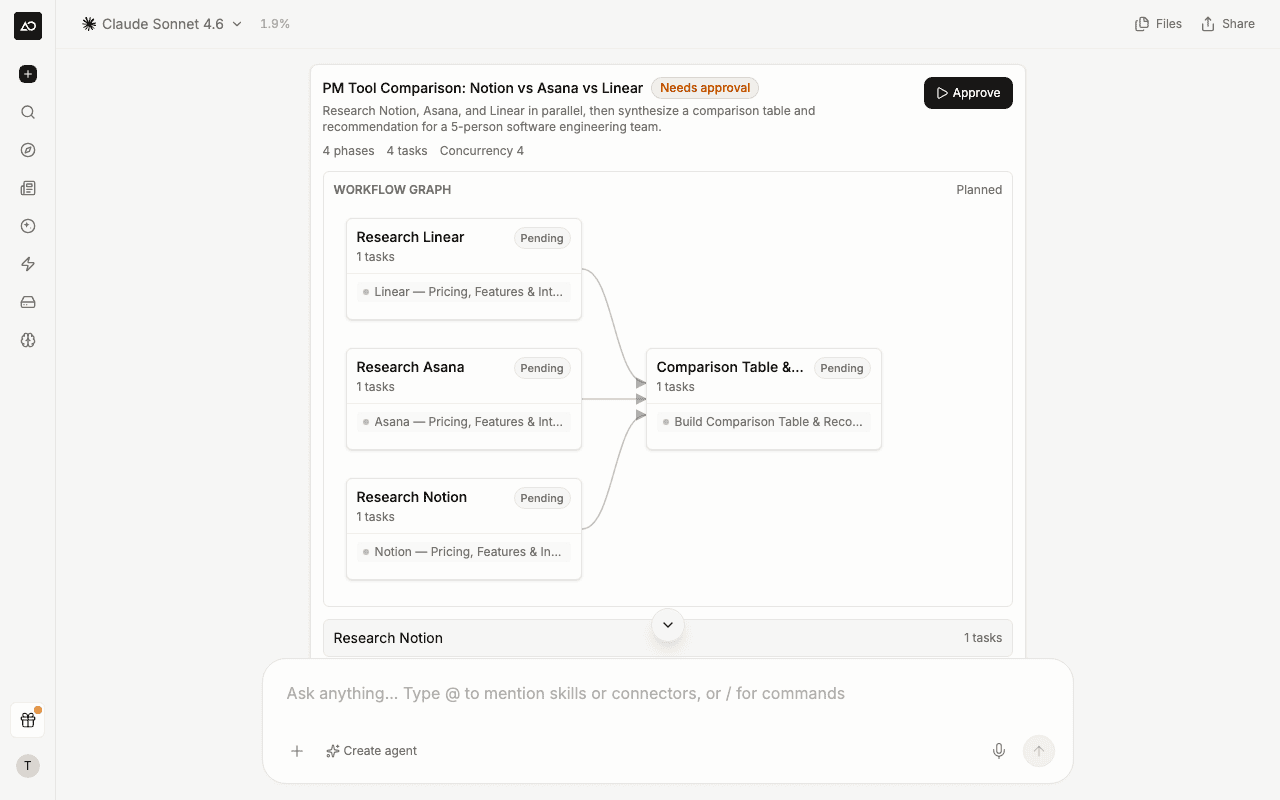
CREAO responds with a workflow proposal: a visual graph of connected tasks plus an expandable breakdown of each phase, so you can see how steps depend on one another before anything runs.
3. Approve to run
Click Approve. The plan is locked in and execution begins immediately, with progress appearing in the same thread.
Starting a dynamic workflow
Type the /workflow command in the chat input, followed by your goal. A few variations are available:
Referencing skills with @
While describing your goal, type @ to reference a specific skill or connected service inline. CREAO factors those capabilities into the plan it proposes, so a step can use exactly the tool you intend.
Approving the plan
Before anything runs, CREAO proposes the workflow as a structured block in the chat, not just text. The proposal shows a name and description, the phases and tasks it will run (and how many run at once), a visual graph connecting the phases, and a Needs approval badge while it waits for you.
Expand Show details to review each phase and its tasks. When the plan looks right, click Approve to start it. Approval is required: a workflow never runs until you approve it. If a proposal is not what you wanted, just describe the change or send a new request instead.
Watching a workflow run
Once approved, the workflow graph updates live as CREAO works. Each task carries a status, so you always know where things stand:
The workflow block also shows an overall progress counter (for example, 3/12 tasks) and a running cost estimate as tasks complete. Phases that depend on earlier phases are connected with arrows, so you can follow how results flow through the plan.
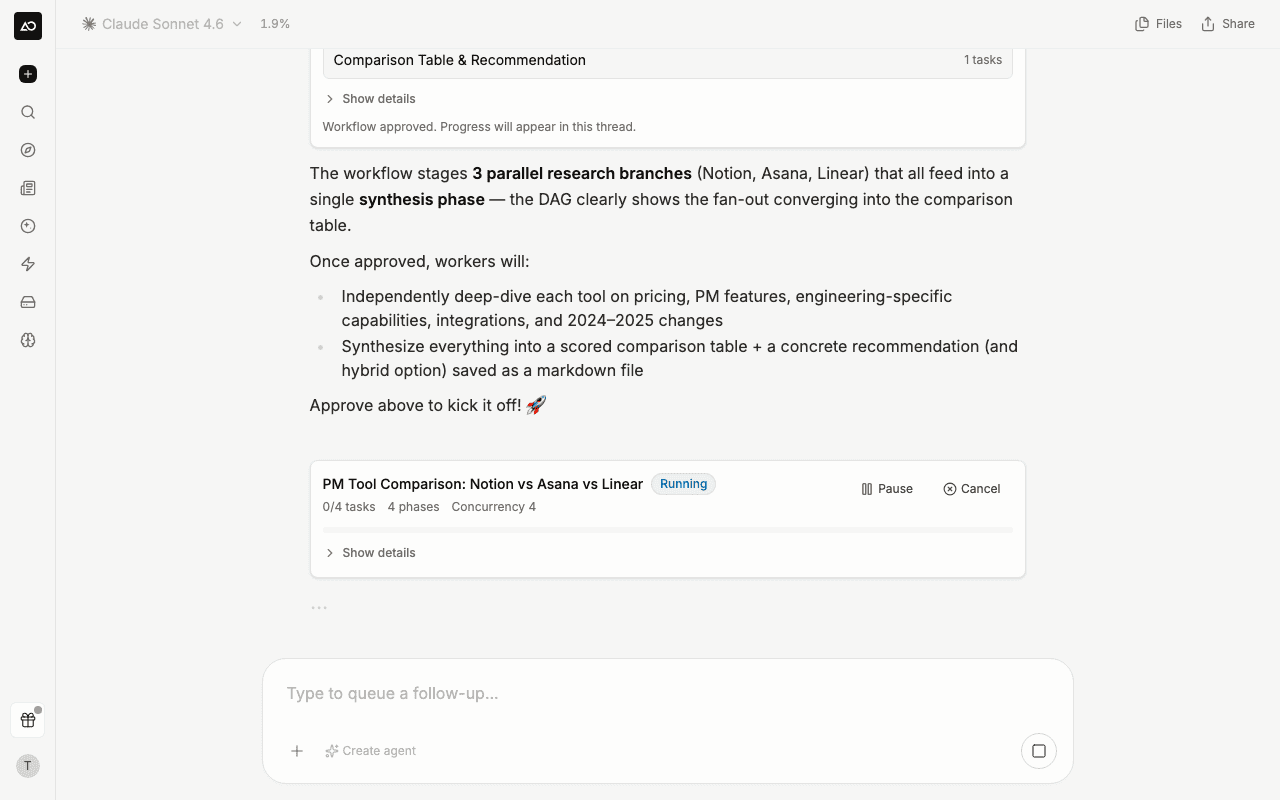
Controlling a running workflow
Inspecting a task
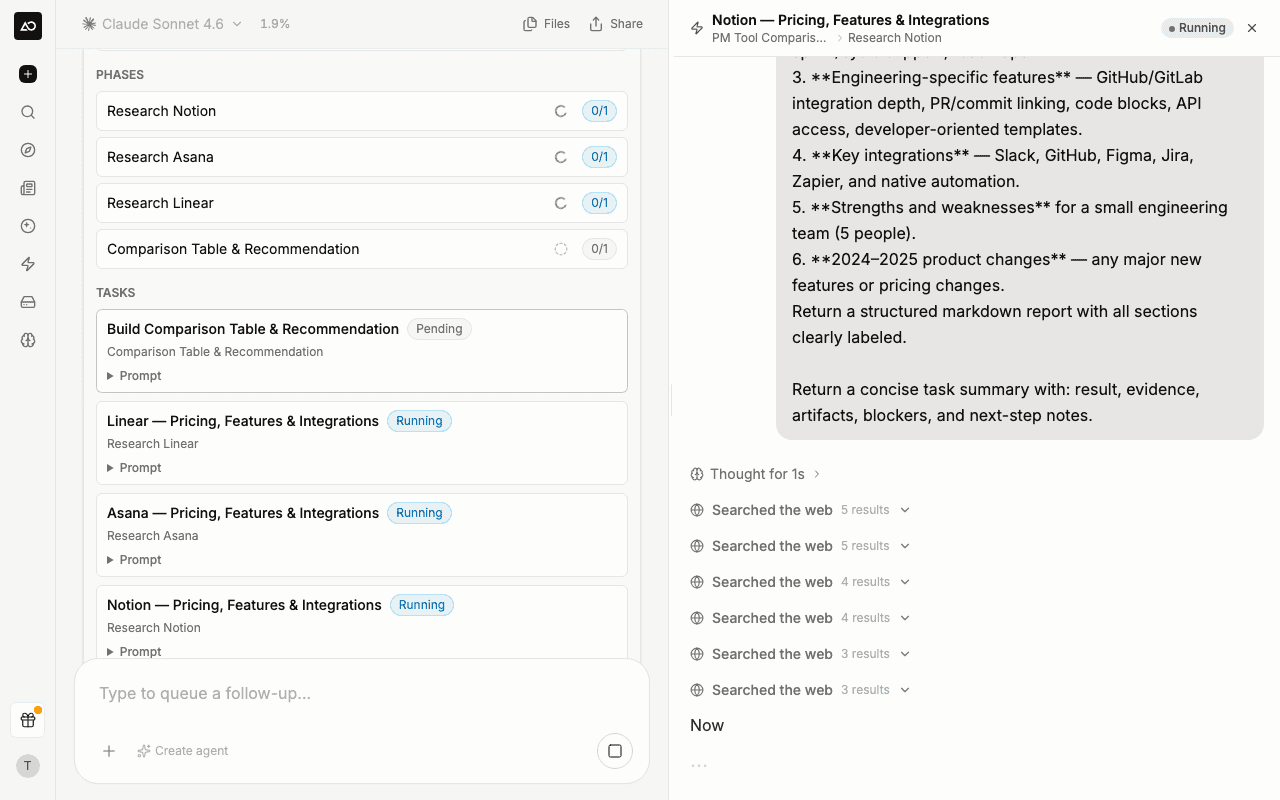
Click any task in the plan to open a side panel showing exactly what that step's sub-agent is doing: its thinking, tool calls, and generated output stream in real time, using the same rendering as the main chat. Instead of waiting for a final summary, you can open any task (running or finished) and follow its work step by step.
A task that has not started yet shows as queued; once it begins, its activity streams in and scrolls to the latest as it arrives. The task panel and the artifact preview can be open at the same time, so you can inspect a step's reasoning while keeping a generated file in view.
Dynamic workflows vs agents
Dynamic workflows and agents solve related problems from opposite ends. A workflow is the right tool for a one-off, multi-part request. An agent is the right tool for a process you run again and again.
Rule of thumb: if you would type the same request again next week with different inputs, build an agent. If it is a one-time push, run a dynamic workflow.
Dynamic workflow use cases
Dynamic workflows shine whenever a goal fans out into parts that can run in parallel or build on each other. A few common shapes:
Best practices
You approve, CREAO structures. CREAO decides how to break the goal into phases and tasks based on what you describe, so a clear, well-scoped goal produces a better plan.
Workflows run on credits. The proposal shows an estimate; the actual cost depends on the models and tools each task uses. Larger plans with many parallel tasks cost more, so scope the goal to what you actually need.
Shared threads are read-only. When you open a shared, read-only thread, workflow controls do not appear. Viewers can follow along but cannot start or approve a run.
For processes you repeat, reach for an agent. A dynamic workflow runs your goal a single time. If you run the same multi-step process regularly, an agent packages that work with structured inputs and can run on a schedule.